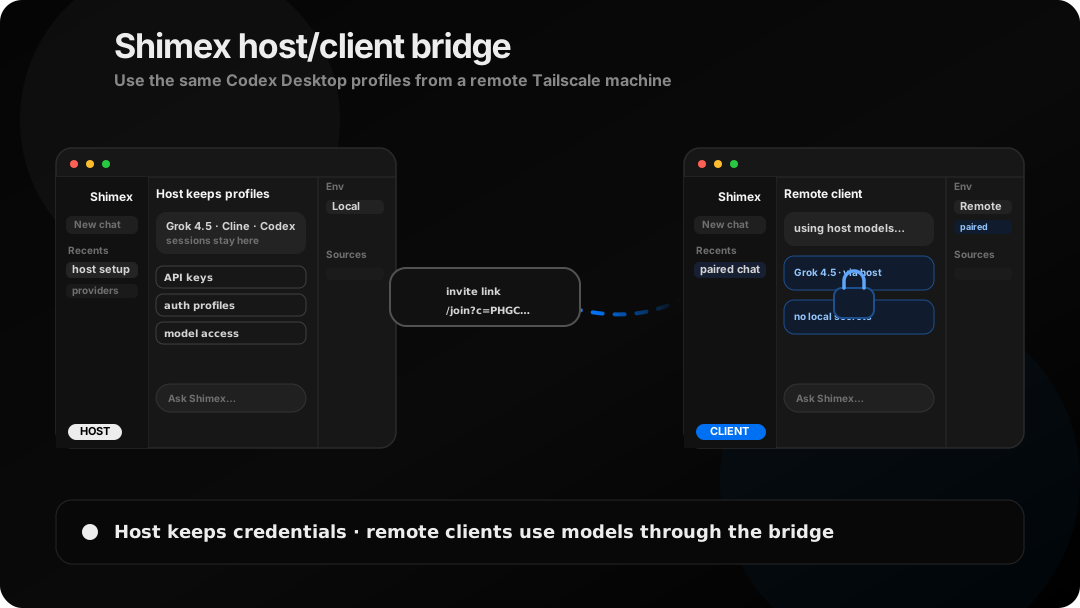
Shimex host/client bridging lets a remote machine use the models already configured on your host. If the host has a working Grok 4.5 session, a client on the same Tailscale network can select Grok 4.5 in its managed Codex Desktop app without logging into Grok or copying any API keys.
What you get
- Grok 4.5 appears in the remote client's Codex model picker when the host session is valid.
- The host keeps the Grok, Codex, and Cline sessions and provider keys.
- Pairing uses an expiring one-time code, followed by a revocable client token.
- The host gateway can stay online even when the host's managed Shimex.app is closed.
- Host admin controls stay local by default; remote clients receive model-use and catalog-read access.
Set it up over Tailscale
Sign in and keep the host reachable
On the host, finish the Grok login and confirm the model is visible locally. Shimex reads the host's local Grok session; the client does not need its own login.
grok login
shimex host up
If the host URL is not already advertised as a Tailscale address, make the gateway reachable on the Tailscale interface and pass the host URL when creating the invite:
shimex host code --url http://HOST_TAILSCALE_NAME:5413Create the one-command invite
Open http://127.0.0.1:5413/admin and choose Create client command, or generate one from the terminal:
shimex host codeThe generated command includes an expiring pairing code. Share it only with the intended client.
Run the setup command
On the remote machine, paste the command from the host:
curl -fsSL 'http://HOST_TAILSCALE_NAME:5413/join/setup.sh?c=ABCD-EFGH' | bashThe script saves a client session, prepares the managed app when Codex Desktop is installed, and writes a profile that points at the host gateway.
Open the managed app and choose Grok 4.5
shimex app startSelect Grok 4.5 in the model picker. Requests now travel through the host bridge while the host's local Grok session handles upstream authentication.
What crosses the bridge?
The client receives the host gateway URL, a client ID, and a revocable token. The default client scopes are models:use and catalog:read. The host's provider API keys, Grok session, Codex profiles, and Cline profiles stay on the host.
Tailscale supplies the private network path; Shimex supplies the pairing and authorization boundary. Treat the generated command like a credential until it is redeemed, and revoke the client if the machine is no longer trusted.
shimex host clients
shimex host revoke CLIENT_ID
# or revoke every paired client
shimex host revoke-all
Troubleshooting
The client gets HTTP 401
The saved client token may have been revoked or expired. Generate a fresh invite on the host and rerun the command. The setup script validates a saved token and automatically re-pairs when a fresh code is present.
Grok 4.5 is not in the picker
Confirm that the host can see its Grok session and that the host catalog has refreshed. Restart the persistent host if configuration changed, then restart the managed client app:
shimex host down
shimex host up
shimex app stop
shimex app start
The client cannot reach the host
Check that both machines are connected to Tailscale, the host advertises its Tailscale hostname or IP, and the gateway is bound to a reachable interface. The host's local admin page is not the same thing as the address the client should use.
FAQ
Does the remote client need its own Grok login?
No. Only the host needs the Grok session. The client uses its scoped Shimex token.
Does the host need Shimex.app open?
No. shimex host up keeps the backend running independently from the managed app window.
Are provider secrets copied?
No. The bridge transports model requests and responses; provider credentials remain on the host.
How do I stop only the client app?
Run shimex app stop. Use shimex host down only when you want to take the host gateway offline.